Display Inline and Display inline blocks.
These are 2 separate ways of displaying elements using CSS.
Display: inline will allow you to put separate elements on
the same line, appearing as part of the same paragraph, on the same
line. It will ignore width and height, and padding will display over
the lines above and below. For example the below CSS produces the
text in example 1 on the right:
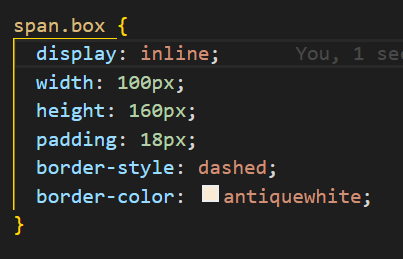
I’ve put in border style and color so we can see where the padding
ends. You can see that even though we’ve put in padding and width
tags, they are ignored. The dashed lines show the padding which acts
normally around the sides, but overlaps with the bottom and top
lines.
This tag should be used when an element needs to look like part of a
bigger paragraph or chunk of text. For example you could use it to
give embellishment to a link. Just be careful with the padding!
Display: inline-block Is similar but the height and width are
not ignored, so it treats the element as its own separate rectangle,
while it still keeping it on the same line. The below CSS produces
example two on the right:
Because the height and width are not ignored, and the padding is not
overlayed, this tag is more suited to creating specific buttons.
While being on the same line, they are more obviously a seperate
element.
Examples
- Rhubarb rhubarb walla walla rhubarb rhubarb walla walla rhubarb rhubarb walla walla rhubarb rhubarb walla walla rhubarb rhubarb walla walla rhubarb rhubarb walla walla rhubarb
- Rhubarb rhubarb walla walla rhubarb rhubarb walla walla rhubarb rhubarb walla walla rhubarb rhubarb walla walla rhubarb rhubarb walla walla rhubarb rhubarb walla walla rhubarb